
Planning a K2 blackpearl Upgrade
A guide for planning a successful upgrade to K2 5.9


The end of extended support for K2 blackpearl 4.7 is fast approaching. If you haven’t started planning your upgrade strategy, now is the time because December 31, 2025 will be here before you know it and you will be left on unsupported software. (see Support Lifecycles)
Many factors play into deciding exactly how to upgrade and this can make the whole process seem complex. This guide should help outline some ways to approach the effort.
IMPORTANT: Speaking of end of life, Visual Studio 2015 which is required for developing K2 blackpearl workflows reached end of life on October 14, 2025, so while you can still run the workflows the ability to develop K2 blackpearl workflows is already out of support. Another compelling reason for the upgrade to K2 5.9.
Step 1: Check the Versions, All of Them.
First, determine what version of K2 you are currently running. Refer to the Release Upgrade Compatibility Matrix to determine the upgrade path that must be followed to reach K2 5.9.
For example, if you are currently running K2 blackpearl 4.7, it will be necessary to upgrade to K2 5.7 before you can finally upgrade to 5.9.
After the upgrade path is determined, the next step is to refer to the Nintex K2 Product Compatibility matrix to cross reference the current Windows Server and SQL Server versions currently installed against what is supported by the intermediate and target versions of K2.
Using the 4.7 to 5.9 upgrade scenario as a real-world example from a client who is running Windows Server 2016, referring to the installation compatibility matrix we can see that both 4.7 and 5.9 are supported on Window Server 2016 so no operating system upgrades are required to do an in-place upgrade of K2.
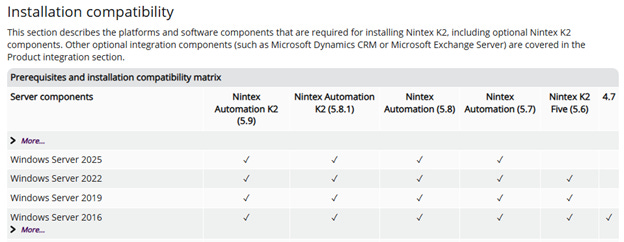
In the chart above, you can see that you could get away without upgrading the Windows Server since all versions in your upgrade path are supported in 2016: 4.7 (current) to 5.7 (intermediate) to 5.9 (final).
IMPORTANT: From K2 blackpearl 4.7 to K2 Five there are changes to licensing details and software keys so that will need to be worked out ahead of time with your Nintex Customer Success Manager or Nintex Partner.
The same version verification is required for SQL Server versions. Keep in mind that there is also the added dimension of checking the SQL Server’s operating system’s requirements against any anticipated operating system upgrades.
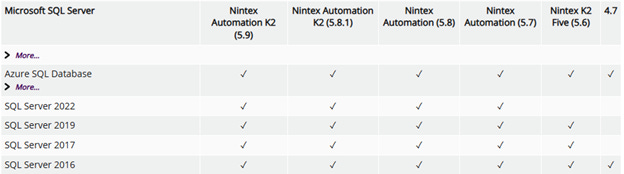
Another dependency to not forget about in the planning process is SharePoint. There is a chart for those supported version as well.
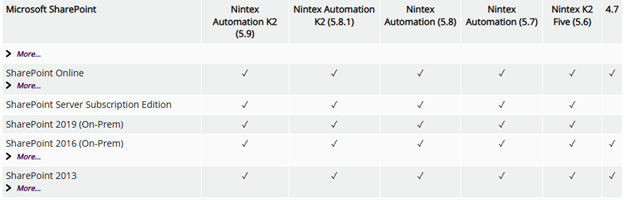
As a reminder, the full support matrix can be found here: Nintex K2 Product Compatibility
Step 2: Assemble the Team
A K2 upgrade should not be completed in a vacuum. This is going to be a team effort. K2 solutions span an organization, and both depend on and impacted by other parts of the IT organization. The AD team, Networking (DNS) team, Security (if applicable), Infrastructure (hardware / virtualization), DBAs, and business stakeholders should all be either advised or involved in the planning process for the upgrade. The more complex the planned upgrades the greater the importance of active involvement and the need for them to be on standby when the day of the upgrade arrives.
Step 3: Decide What is Being Upgraded
The risk that I have seen come into play is attempting to do too much all at once.
I have seen teams that want to change out the SQL Server version, the OS version and move to new hardware in pretty much one go.
The infrastructure team may want to upgrade the SQL Server or Windows Server versions as part of the K2 upgrade. Window Server 2016 reaches extended support end of life on January 12, 2027 and pressure will me mounting to move onto a supported operating system.
I highly recommend treating the K2 upgrade and the underlying server software upgrades as two separate projects. The approach I found to be more manageable and help mitigate risk is to upgrade either K2 or OS versions, ensure stability then upgrade the rest.
Step 4: Choose How to Upgrade
We now know how to get to K2 5.9, we understand the supporting software version implications, and we want to start the upgrade. Where do we start and what do we mean exactly by “upgrade”?
It is this step where the environment setup you are working with does begin to strongly factor into the decision-making process. The goal is to get on a newer version but how do you want to get there?
This is the point where all the stakeholders need to come together and reach a consensus.
Is there going to be an attempt to do an in-place upgrade?
Is the plan to bring up brand new servers and just move the K2 database?
There is a lot to consider. I generally prefer to go with a bit more conservative approach as I like to reach clearly defined goals that leave behind an operational environment just in case something unexpected occurs.
The order of operations I prefer to follow is:
Stop the K2 Services on all nodes. Before the final backup, stop all the K2 services on each node in the farm. The K2 data needs to be persisted to the database and in a static state. If the K2 server is running, data could be changed after the database backup was completed leaving you with a stale backup.
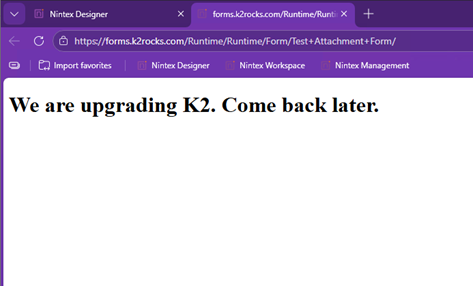
Use an app_offline.htm file to gracefully take SmartForms offline. Using the built in functionality to .NET, an app_offline.htm file can be placed at the root of the SmartForms website to take the site offline. Placing the file in “<Installation Location>\K2\K2 SmartForms Runtime” will cause the contents of the file to be displayed instead of the normal website execution effectively taking the site offline.
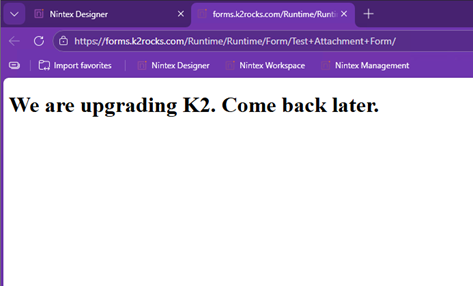
Mastery Tip: Using a app_offline.htm file is also a great approach to communicate with your user base to convey what is happening along with expected timelines instead of them being greeted by an uninformative error message.
Take Backups of VMs and Databases! I am sure it goes without saying, but it is important enough to reiterate.
Have a rollback plan. Most of my suggestions in this list come with an implied rollback plan but make sure yours is understood by the team.
Schedule an adequate maintenance window. This is not a project that should be planned to occur on a Friday after 5 and be ready for testing on Saturday morning. The more mature the K2 environment that greater the potential there could be a snag, especially when making a large jump from 4.7 to 5.7.
Plan to upgrade a lower environment first. If your organization has the standard Dev, QA and Prod setup or similar. I recommend upgrading one of the lower environments first. Generally, QA is similar enough to Production that it can be used to validate an upgrade plan. Also, leaving Development intact gives the K2 development team the ability to continue to support Production break fix issues while QA is being upgraded. This does break the typical change management pipeline, and I only suggest it for emergency Production support scenarios. Then upgrade Development leaving Production for last as that offers two opportunities to try to search for any potential roadblocks.
Make the least disruptive change first. For example, an in-place SQL Server upgrade is generally going to be less disruptive to the environment than moving to new hardware and at the end, the K2 environment should be left in a functional state, just with a newer version of SQL as the backend.
When moving a database to new hardware, move it before upgrade. I prefer moving databases before attempting a K2 upgrade as it allows for the validation of the database on the new server with a known environment before attempting an upgrade of K2.
MASTERY TIP: If you must choose what to take extra care with during the upgrade, always choose the database. K2 server nodes are replaceable.
When upgrading K2 server hardware, upgrade K2 first. This may be a controversial take but hear me out. If there is a need to move the K2 servers to new hardware, I think upgrading K2 in place on current hardware allows for the validation of the upgrade. Then, the new hardware can be added to the K2 server farm as additional nodes. This approach keeps the whole farm functional, old nodes can be turned off to allow for validation of the new nodes, and the old nodes are still available as a fallback. Once everything is validated, remove the old nodes.
MASTERY TIP: This approach can be used for single node farms assuming they were installed as farms. K2 should ALWAYS be installed as a farm. This setups up the farm with a DNS entry and not taking a dependency on the machine name which allows for maximum flexibility.
BONUS: Existing K2 single server installs can be reconfigured to operate in farm mode by running the setup manager. You would just need to update any links or connection strings to the K2 server, plus if you are using Kerberos, update the SPNs of the K2 service account and potentially the application pool identities of the web-based components of K2. It depends on your overall installation details. If you are planning to do this, test in a lower environment first to work out the specifics.
Leave SharePoint for last. SharePoint can be a significant dependency for K2 solutions, but it isn’t critical for the operation of the K2 farm in a foundational way like Windows or SQL Server. New SharePoint farms can be stood up and site data migrated, but the final connection to K2 cannot occur till K2 upgrades are complete.
I realize that not all situations are created equal. The steps outlined are how I prefer to think through an upgrade. These are offered as better practice. Ultimately, it is up to your comfort levels and being pragmatic about your situation that should guide your choices.
Step 5: Uncertain? Call For Backup
If you are feeling nervous about an upgrade at this point, it’s natural. I’m a big proponent of erring on the side of caution when it comes to production systems, which why I may be a bit more verbose in my approach than necessary.
However, it should be noted that certain upgrades, while seemingly straightforward, may encounter unforeseen challenges for various reasons.
I have seen this issue primarily impact older, legacy K2 installations by causing database compatibility problems—particularly in environments that originally started as K2.NET 2003 installs, were later upgraded to K2 blackpearl (with multiple databases), and then further consolidated into a single K2 blackpearl database.
That much evolution over the years can leave database artifacts behind that can confuse the more modern upgrade installers.
Nintex Professional Services does offer two flavors of upgrade assistance, one for working hours and one outside of working hours, which can be helpful to have on standby for a production upgrade. I’d recommend reaching out to your Customer Success Manager to find out more.
The Best of Both Worlds
There is one guaranteed way to have a successful K2 upgrade, don’t.
If your organization is facing both a k2 blackpearl workflow migration to K2 Five design tooling along with upgrading K2 to version 5.9 then maybe not upgrading your existing farm is a consideration and simply standing up a new farm alongside the legacy farm is a viable path.
This is also an opportunity to take a critical look at existing workflows that are being migrated and determine what changes need to be made. Business needs evolve but did those workflows? Having parallel environments provide the organization with a much longer runway to have those conversations.
I have a client that is currently standing up a brand-new K2 5.9 farm on Windows Server 2025 after making the choice to leave the K2 blackpearl servers behind. They are taking a drain stop approach updating the K2 blackpearl workflows to K2 Five and deploying them to the new farm. Existing workflow instances will finish on the old farm and new instances will start on the new farm.
And that is a valid choice.
There is a lot of nuance and edge case scenarios to be considered that are more business operations and compliance questions than technical, but depending on your organization’s situation, it could potentially be the path of least resistance.
There are also some license implications but historically it has been my experience that Nintex has been working with customers to get over any of those hurdles and should be discussed with your Customer Success Manager or Nintex Partner.
If you are planning an upgrade and have questions, please feel free to drop me a line at hello@caseitsolutions.com.